
May 17, 2009 by Vincent
Firefox: ‘Set As Desktop Background’ Missing
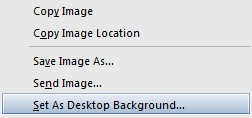
"Set As Desktop Background" option from Firefox's context menu
Is the “Set As Desktop Background” option from your Firefox’s context menu (right-click option menu) gone or missing, for no apparent reason? It’s a handy option when you’re browsing for new wallpapers and wanted to see how it looks like on your desktop, and it’s such a pain when you know the option is missing.
 It turns out that even Firefox add-on coded by Mozilla itself is not perfect. Mozilla Prism, a Firefox add-on that allows you to launch web applications right from the desktop independently, will disable the “Set As Desktop Background” option from Firefox’s context menu.
Simply disabling the Prism add-on and restarting Firefox will bring back the “Set As Desktop Background” option. The previously created desktop or start menu shortcuts to web applications using Prism will still work even if the add-on is disabled in Firefox. Meaning you can choose only to enable the add-on whenever you want to create a new web application shortcut.
If the “Set As Desktop Background” option is missing even if you have not installed the Prism add-on, you might want to check if you have disabled it via userChrome.css.
Open userChrome.css using ChromEdit Plus OR from:
- Windows Vista – C:\Users\[USERNAME]\AppData\Roaming\Mozilla\Firefox\Profiles\[xxxxxxx].default\chrome
- Windows XP – C:\Documents and Settings\[USERNAME]\Application Data\Mozilla\Firefox\Profiles\[xxxxxxxx].default\chrome
- Mac OS X – /Library/Application Support/Firefox/Profiles/[xxxxxxxx].default/chrome
- Linux – ~/.mozilla/firefox/[xxxxxxxx].default/chrome
Make sure the following either of these codes are not in your userChrome.css:
Code 1
#context-setDesktopBackground {

   display: none !important;

}
Code 2
menuitem[label="Set As Desktop Background..."]

{

display: none;

}
Thankful - May 29, 2009 @ 9:35 am
THANK you. I never would have figured that out! Why in the world does it do that?
Vincent - May 29, 2009 @ 1:46 pm
Welcome. I have no idea why, maybe they will fix this bug in the next update, hopefully.
LithiumMind - June 3, 2009 @ 1:10 pm
Thanks for the solution. I always wanted to know how to solve this problem.
koocola - June 5, 2009 @ 12:57 am
thnx 😀
RealLifePixel - December 4, 2009 @ 10:13 pm
Thanks. Much appreciated.
Jason - January 13, 2010 @ 11:25 pm
Thanks a lot! Now I know why…… just hope they will fix it in next update of Prism.
Roy Vincent - June 4, 2012 @ 12:26 am
how can I do it on firefox 12?