
July 23, 2010 by Vincent
Hide Title Bar in Firefox (a la Chrome)
If you have used Google Chrome, you would know how simple the user interface is. Google basically only includes essentials in Chrome, eliminating all pointless element. Title bar being one of them. It serves no purpose but occupy precious screen real estate, especially for netbook users.
I would have switched to Chrome as my primary browser if not for the Firefox add-ons I cannot live without. If you are on the same boat, you would want to have a look at this Firefox add-on — Hide Caption Titlebar Plus.
Installing this little add-on will remove your Firefox’s title bar, and move the “minimize, maximize & close” buttons down. This is how my Firefox looks like without the title bar:

(If you’re wondering, I’ve tweaked other elements also in this screenshot: refer to More Room, Less Junks section)
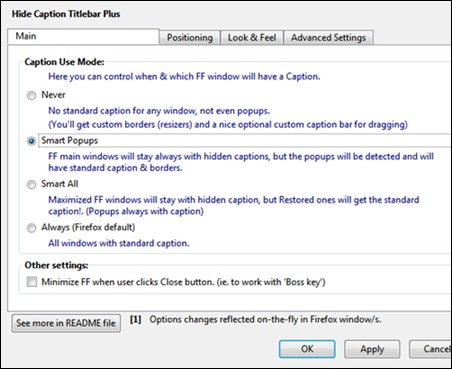
The options are pretty extensive, allowing you to dictate which window’s title bar you want to rid, which you want to retain (e.g. pop ups).
Now we can have most screen real estate for things that matters 🙂
Umair - July 29, 2010 @ 10:32 pm
Nice add on. I am going to give it a try for sure
Vincent - July 30, 2010 @ 10:37 pm
Let me know if you like it 🙂