
February 20, 2008 by Vincent
[Live Messenger] Disable Windows Live Today Popup
MSN Messenger/Windows Live Messenger has a quite annoying feature to me, which is having a popup of Windows Live Today/MSN Today every single time you sign into your account. That might be useful to some, but in my case, I am not using Hotmail, thus making the pop-up not useful at all.
To disable Windows Live Today, simply follow the instructions below.
For Windows Live Messenger 2009:
- Click on Tools, select Options
- Click on the Sign In tab
- Uncheck the Show Windows Live Today after I sign in to Messenger box
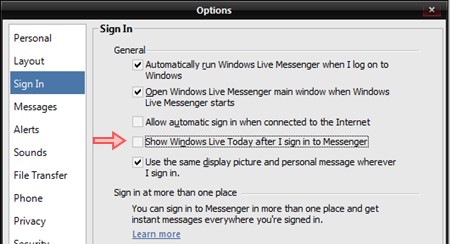
For older Windows Live Messenger or MSN Messenger:
- Click on Tools, select Options
- Click on the General tab
- Uncheck the Show Windows Live Today after I sign in to Messenger box

Voila, the next time you sign into your Windows Live Messenger, the popup will not appear anymore and all you see is just your contact list.
Article updated on 19 May 09 to include guide for WLM 2009
Andrew K Fletcher - April 12, 2008 @ 3:44 am
Nice one, I forgot how to get rid of this annoying pop up, followed your advice and now have one less headache to think about 🙂
Many thanks
Michael J - April 24, 2009 @ 12:49 am
When I open tools>options> there is not general tab with the Taday disable in it? Any suggestions?
IB - October 11, 2009 @ 10:29 pm
Did you even read?
rich - May 13, 2009 @ 7:54 pm
Thanks! That worked for me also. I could care less what the idiots in Hollywood are up to. I get my news from more reputable sources!
Steven P - October 3, 2009 @ 9:45 pm
Thanks…. I have finally found the solutiion to the single most annoying thing in my life. I feel liberated. Thanks again
A. Nonnymuss - July 13, 2008 @ 11:49 pm
Same as comment above, I find it so annoying too
radekg - July 20, 2008 @ 9:23 am
Well spotted. I think I blind – was searching for this option but couldn’t see it, lol.
radekg - July 20, 2008 @ 9:25 am
Should be:
Well spotted. I think I’m blind…
Angie - August 8, 2008 @ 10:11 am
Unlike all of you I would like to be able to read it but it is not in english and have me realy annoyed, can someone tell me how to get it in english.
marcus H - August 31, 2008 @ 10:23 am
Thanks very much it was getting really annoying
red girl - August 31, 2008 @ 9:21 pm
can someone help me, i turned it off but now i want it back and i dont have that option in general menu!
JP - September 9, 2008 @ 12:12 pm
Thx for that. But could anyone tell me the url so i can block it on my proxy server
jojo - September 20, 2008 @ 11:52 pm
another big tanx,
they always seem to put those ‘options’ so far away
aaa - September 27, 2008 @ 11:11 am
it was annoying..
thx for the tips
Kris -Barbados - October 6, 2008 @ 10:57 pm
that pop up was very annoying and useless for me….thanks for helping
FAR - October 10, 2008 @ 3:22 pm
wow, i didnt see that haha. thank you very much!
sim bird - November 6, 2008 @ 4:20 am
how do i stop this annoying windows live today pop-up.
someone help me please, it’s driving me crazy
sim bird - November 6, 2008 @ 4:30 am
i followed the steps to remove windows live today.
but i get to step 3 and dont have that option what should i do now someone help me please
Mick - November 20, 2008 @ 10:45 pm
Thanks mate. I’ve been wondering how to get rid of this damn nuisance !
(L) - December 14, 2008 @ 8:47 am
i don’t have that option please help my windows live freezes because of that popup and i need to remove it please help
JK - December 30, 2008 @ 12:19 pm
I click tools in which application?
Vincent - December 30, 2008 @ 12:42 pm
@JK: In your Windows Live Messenger.
Johan E. Bengtsson - September 29, 2009 @ 12:24 am
The stupid aplication has no Tools option to click… who designed this crappy interface?
trickydicky - January 7, 2009 @ 12:38 am
I have been trying to get rid of that blasted page – and it makes the system slower as well!! Well Done.
Vincent - January 7, 2009 @ 1:38 am
@trickydicky: I’m not sure if it makes system slower, but it is definitely annoying, especially when I’m not interested in those content at all.
Ben - January 12, 2009 @ 10:22 pm
Click the “show menu” button if your menu is not displayed. It is one of the buttons to the right of the search bar, underneath the hotmail email notifier. There you will find the tools menu.
Johan E. Bengtsson - September 29, 2009 @ 12:28 am
Sheesh, that icon was supposed to be self-explanatory? NOT…
(thx, this really helped)
Andy - January 25, 2009 @ 7:14 pm
Maybe I’m being thick here or I have a different version, I dont have a Tools option or a Show menu on the right of the of the search bar, also I dont have a hotmail notifier. Really would like to ditch this stupid popup. I looked on the MS site and it only advices how to remove via Add/Remove programmes in the control panel, this removes messenger completley.
Please help im at my wits end with this.
Thanks
Andy - January 25, 2009 @ 7:20 pm
Found the answer to my problem, hope this helps anyone else, the tools menu refered to above is NOT in the Pop Up which is where I was mislead, its actually in the Messenger application itself.
Problem solved.
Thanks.
Nick - March 8, 2009 @ 4:52 am
Bless you! I don’t know how I started receiving it in the first place and I desperately wanted to get rid of it. Unfortunately because I live in Poland the bloody thing thinks I’m Polish and I have no way of knowing how to change Messenger’s language back to English. So thanks for your simple instructions as I was sick of hearing about Jade Goody* every day and all those really poorly written gossip/list articles.
*Apologies to cancer sufferers, but please – this woman is not a saint.
Kevin - March 11, 2009 @ 8:03 am
Yay! Thanks to you (and the God of Google) I can finally say goodbye to that damn pop-up…
a - April 24, 2009 @ 4:54 pm
ty man!!
Craps - May 4, 2009 @ 9:25 pm
Thanks. We all now know what life is like without having to hear about other people’s
Matina- Greece - June 24, 2009 @ 4:35 pm
Thanks very much. I wanted to get rid of it!
Ari - July 31, 2009 @ 12:08 am
WL Today popup make my touchpad driver error.. sooo annoying.. but now everything will go ok.. million thanks fo ya! 🙂
Richard Schmidt - September 11, 2009 @ 8:47 am
Thanks for your help “Windows LiveMessenger 2009. Now I am free from the annoying notices.
Richard Schmidt - September 11, 2009 @ 8:48 am
Thanks again
Richard Schmidt
tanya - January 23, 2010 @ 6:28 am
trying to get rid of the annoying pop up to sign in to windows live id – not my windows live id account so i can’t go into it and stop it – any other way to do it?
Joy - January 27, 2010 @ 10:36 am
Finally found a help page that had the right info on it to get rid of that idiotic today page. Thanks.
Becky - February 4, 2010 @ 12:23 am
I cannot even find the “tools” button on my Windows Live page. What am I doing wrong?
Michael Yuhasz - March 2, 2010 @ 10:55 pm
Thanks for your help, nice blog!
mike - April 3, 2010 @ 9:34 pm
Thanks for this, you’ve saved me from going MAD and also saved the PC from going through the window.
sure - May 29, 2010 @ 4:20 pm
Thanks a lot krab
bobbyr - July 29, 2010 @ 3:38 pm
I don’t know why you’re griping about Windows Live Today, I like having that to pop up when I sign in, but now all of a sudden I can’t find it and don’t know how to get it back.
Julie - December 18, 2010 @ 11:00 pm
I am using win7, i un-check the box, but it seems not working…anyone have any idea of how to stop the windows live today pop-up?? many thanks!!
Raymund | Brother toner - April 20, 2011 @ 9:06 am
I am also annoyed with the pop up. I used your tutorial to disable it for good.
lilz - June 24, 2011 @ 4:20 pm
i need windows live today tab back:S i know its silly, i use it ofcourse without the automatic pop-up cz it defintly slows down everything, but i got used to it! i dont like the recent version of messenger so im still on version 9. but somehow the tab is gone! from the main page and from the option menu! :S can anyone help me know whats the problem?
Thank you!