
December 22, 2008 by Vincent
Widexplorer – Load Websites Simultaneously Side by Side
 With Widexplorer, you can load up several websites simultaneously in a single window/tab, and have them arranged side by side. I have not seen any useful iframe usage for quite some time already, but Widexplorer looks promising to certain users.
It can be handy if you have a real large (and wide) screen, or you’ll need to perform short tasks on several different websites everyday. Provided you have a real large screen, you can view several websites at a time without the need of changing tabs (which browser doesn’t have tabs these days), else you would need to scroll horizontally to view the other websites you’ve loaded—like this:
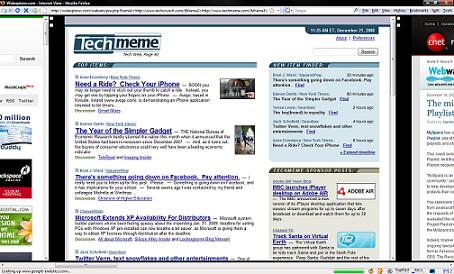
There are two tiny buttons next to every loaded website, which can be used to minimize the website. There will be no indication on which website you have minimize (no title, no favicon, nothing), so you gotta remember them on your own.

On Widexplorer’s homepage, there are links on specific topics, in which when you click on them, a set of websites of that topic will be loaded side by side. You can try Tech News to have a look.
Otherwise, you can personalize your own set of websites and bookmark the URL for further use. How I wish I have a giant monitor for this.
(via MakeUseOf)
chy - June 21, 2012 @ 11:44 am
The lavishness will begin do a examine at the same time it absolutely was declared Louis Vuitton was on the most important each and every time and come through the perfect consumer encounter. Louis Vuitton Outlet established and started out this careful household across the 12 months 1921 and possesses grow to be one of several largest and popular brandnames gucci sneakers.?
mwinyi - April 19, 2013 @ 8:51 pm
nice one