
January 4, 2009 by Vincent
Windows Live Messenger 2009: Features & Customizing Tips
 I consider myself a loyal user of Windows Live Messenger. In fact, I started it using before it is renamed from MSN Messenger. I had once tried Digsby and Pidgin, and recently once again re-try Digsby, but they are just nothing near to my liking.
Another reason is that most of my contacts are using Live Messenger as well, therefore there is no need of a multi-protocol IM for me, and that I had tweaked Live Messenger so much to my liking.
Windows Live Messenger 2009 RC 1 had been released and made available for download in mid-December 2008. These are a few of the obvious changes from WLM 8.5 to WLM 2009:
A whole new conversation window interface
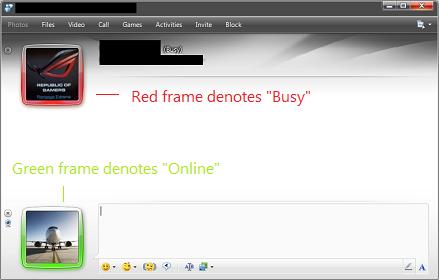
Display pictures are moved to the left. The frame color of display pictures indicates the status of the user:
- Green – Online/Available
- Orange – Away
- Red – Busy
Scene selection
You can customize the look of the messenger by selecting one of the 23 default scene, or you can personalize it by using any picture from your hard disk.
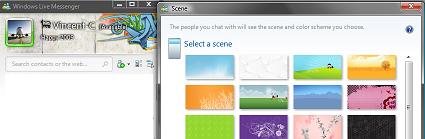
As of now, there doesn’t seem to be a way to delete or remove any scenes, meaning once it’s added it will be there forever, until there’s a fix (if there’s any) in a newer version later.
To delete or remove a scene, just click on the scene you wanted to remove, then click on the red “X”.
Grouped messages
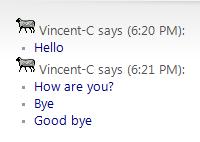 By default, messages sent or received will be grouped together, just like how Chat works in Gmail. To separate those messages so that they would look how they would in WLM 8.5:
Go to Tools → Options... → Click on Messages tab → Uncheck the “Group sequential messages from each contact together” box.
Status options reduced to 4
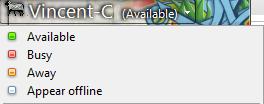 No more unnecessary stuff like “Be right back” and “Out to lunch“. The remaining 4 options are:
- Available
- Busy
- Away
- Appear offline
Too bad, it is still not possible to have a custom status.
Animated .gif can now be used as display picture
The good is we can now have an animated or moving picture as our display picture. The bad is it might be abused, flashy bright annoying animated display picture anyone?
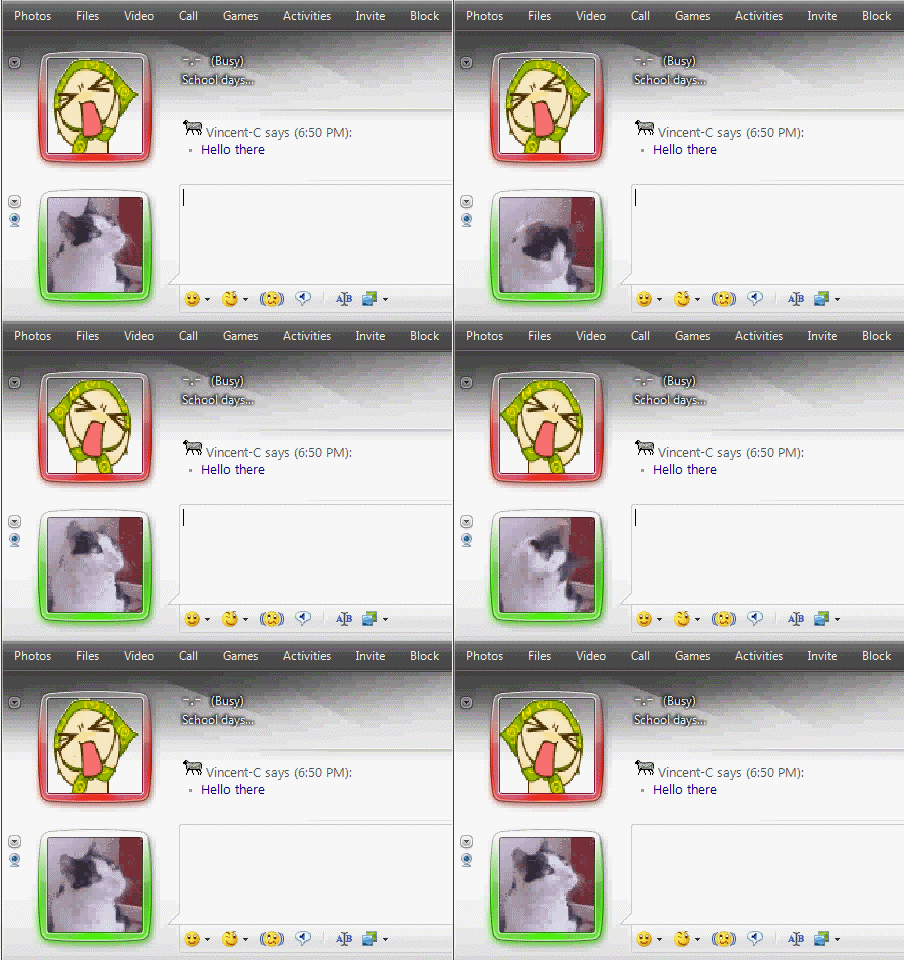
You like to, move it!
— — — — — —
And some customizing tips:
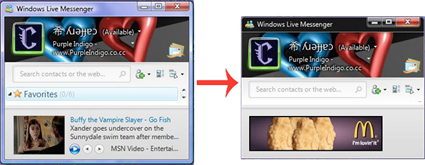
Remove Aero window frame in Windows Vista
In WLM 8.5, removing the window frame is just within a click. But in WLM 2009, there is no option to remove the window frame if you are running on Windows Vista with Aero enabled. However, this can still be done by tweaking the registry. Head over to Purple Indigo to learn more about it.
Remove Ads & Customize further with A-Patch
 I had previously posted about A-Patch. For Windows Live Messenger 2009, there are only 10 tweaking options offered by A-Patch. But they are good enough in my opinion. They did what they are suppose to, which is to remove annoying banner and text advertisements, as well as remove nudge delay.
This is one of the reason I’m staying so long with WLM. WLM with ads is not my taste.
Download A-Patch according to your WLM version, which can be checked at Help → About messenger.
Color scheme for conversation window
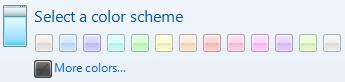
Conversation windows by default will not follow the selected color scheme, but remain as the default blue color. To ensure all conversation windows remember and follow the selected color scheme, you have to configure it manually.
Here’s how:
- Open a conversation window (any contact will do)
- Click on the “
Show menu” icon at the top right corner - Select “
Tools” and click on “Use the default scene “
The alert notification behaves the same as the conversation window. It will not follow the selected color scheme, but remain in blue instead. I’m unsure how to fix this one, any idea?
Kelle - January 8, 2009 @ 5:55 pm
Aha! That’s so cool! I’m downloading it!
Jane - January 10, 2009 @ 11:31 pm
I love it sept the disply name colour thing is a but of a bummer
I mean i dont mind not having it but its annoying when all you can see on my friends names are
[b]Blahh[/b] [c=23]eg, eg, eg[/c]
Vincent - January 16, 2009 @ 2:54 pm
You can only see those colored names if you have MsgPlus! installed. I personally prefer not to install that one, and yeah, there are quite a number of contacts of mine having those [c=23] tags too. Kind of annoying.
silvia - January 11, 2009 @ 8:38 pm
about the Color schemes for conversation windows… in my previous version of windows live messenger, i could have a different colour for each contact, e.g i made one contact have a contact window of blue, another one yellow ect and on this one it only seemes to have two options, to have all your contacts the same colour as your main window colour or blue. its really annoying. is there a way to change that? coz i want my contacts to be differnt colours.
Vincent - January 16, 2009 @ 2:37 pm
For now I haven’t figured that out yet. But you can change the background for each contact though.
Mario - February 10, 2009 @ 6:16 am
i would also like to know if this is possible..if so contact me .. [email protected]
Anna - February 20, 2009 @ 12:56 am
Yes, for the love, if you figure this out please let me know. Thanks!
JavieR - February 25, 2009 @ 10:38 am
I also would like to know how to keep each contact with a different color… is very helpful if you have many conversation windows
Cara Waters - March 14, 2009 @ 10:16 pm
I am guessing for now the easiest thing to keep all the custom colours would be just to save jpg. files in the colours we want and load them up as the background. It seems a shame though i liked being able to tell who i was talking to by colour, hopefully someone will find a solution.
Bunnie - September 11, 2009 @ 3:11 pm
I want to know how also…let me know if you found out how to do it. 😀
ju - March 18, 2009 @ 8:59 am
how do you put it with the colour of the main menu?
Chris - January 16, 2009 @ 11:13 am
Delete Scenes by clicking the red X.
Vincent - January 16, 2009 @ 2:38 pm
Thanks Chris, I’ve updated the post 🙂
kyle - January 22, 2009 @ 5:12 am
hey does anyone know if there is anymore backgrounds that i can download for the new msn
Alley - January 26, 2009 @ 9:51 am
Does anyone know if there is a way to restore a scene if you accidentally delete one? I’ve tried uninstalling and reinstalling to no avail.
Stephanie - February 5, 2009 @ 1:16 pm
What I did was when you go to uninstall it, select “repair” instead. It told me it couldn’t repair messenger, but when I opened it back up, all the themes were there again.
stacey - June 17, 2009 @ 10:06 pm
If you accidentally deleted a scene (like I did) just delete the other scenes available, except for the default one (the blue one with white rays). Sign out, Exit/Close your messenger, and Sign in again.
Weird ms logic, but it works. 🙂
Terry - February 6, 2009 @ 8:31 am
is there any way to move the display picture back to the right? it’s really weird this way..
Vincent - February 6, 2009 @ 2:32 pm
At this moment, I don’t think so. It’s just the matter to getting used of, doesn’t really matter whether they’re at the right or left.
Brendan - February 12, 2009 @ 4:44 am
yes it does. It does a lot. The pictures being on the left are SO GD annoying. I keep clicking on my display picture wanting to start typing and it opens up that bullshit blue menu.
AricCougar - February 9, 2009 @ 4:13 am
Has anyone ever noticed that the Display Picture (in the window of your conversation) occasionally “flashes” or “blinks”? Or rather the border around it does.
I’ve been thinking, and while I can’t be sure what this means, I think it is showing when the person im talking to has selected our chat window on their computer, and is reading what i wrote.
Does anyone really know for sure?? Or have you at least seen this “feature”?
Vincent - February 9, 2009 @ 4:55 pm
I’ve not notice any flash or blinks on the display picture border, except for when either me or the person I’m chatting with changes status.
When I change from Online to Busy, the border color changes from green to red, with a little animation that might be the blink you pointed out.
Why not you try experimenting with your friends to see if it works like you have suspected, blinks when the user at the other end is selecting the conversation window. Let us know here when you do so. Thanks 🙂
Mevin - March 8, 2009 @ 10:00 pm
how to uninstall windows live messenger 2009 on vista as it doesn’t apear on control panel add and remove program
thank you for your support
wating for yor reply
Email [email protected]
Amanda - March 16, 2009 @ 11:41 pm
My messenger does not blink to indicate when a contact has replied to my instant message or when they have sent me an instant message. Is there any way to rectify this problem?
Mugen - March 17, 2009 @ 8:56 am
Hi, I want to know if there’s an option to put the DP in the conversation window on the right, it’s really bothersome for me like this.
Also the color of the frame of the DP that changes with each status, I hate that, is there a way to turn it off, or to simply change the status colors?
Thanks in advance
Jo - March 26, 2009 @ 1:42 am
I can’t seem to use GIF’s as a display picture. I get a “not a valid image” message with the ones I’ve tried (of various sizes).
Is this an XP issue?
Mystique - April 8, 2009 @ 4:18 am
group sequenital messages from each contact together…?
What does that mean, and like is that for when it says “says” instead of it saying “says” it just puts those dots?
Because, I like when it says “says” after EVERYTHING you type/setence, etc.
…Annoys me when it doesn’t.
please e-mail me, the answer, ty.
Vincent - April 8, 2009 @ 2:21 pm
Tools > Options > Messages > Untick Group sequential messages from each other together.
Big D - April 22, 2009 @ 9:17 am
Ok, so I’m trying to add a cool background to the chat box (conversation box with your friend) but everytime I try to put a picture of something the quality is terrible and doesn’t fit… any help? The same thing goes with the “scene” Doesn’t show much and when I customized the picture to a smaller size some do show what I want but yet again bad quality.
—x3Black - May 25, 2009 @ 3:24 pm
ehh how to download the one that when ur name appers it is in colour?
Vincent - May 25, 2009 @ 5:10 pm
http://www.msgplus.net/
Nick - May 28, 2009 @ 4:12 am
The status options were IMPORTANT for me! I am actually considering switching back to the old version because I can no longer set my status to ‘on a call’ or ‘be right back’. Is there anyway to use the new version and add the old status options back in? Registry hack maybe? Anyone know??? Thanks.
al - August 26, 2009 @ 8:56 pm
nick, the problem is people with the new client WON’T see the “be right back” status even if you set it on 8.5 so we’re screwed anyway 🙁
Tim - June 1, 2009 @ 5:02 am
About the colour scene being the same in conversation, you can basically set it, at the conversation, on the top right corner of the conversation it will show Show Menu icon click on it, then go to tools and select “Use Default Scene” then you’ll get the conversation one to be the same as the colour scene.. Cheers. 🙂
nat - June 10, 2009 @ 3:42 pm
I accidentally downloaded one of the theme packs, any idea on how to remove it? I’m so sick of seeing “I’M A PC”
dana - October 10, 2009 @ 4:28 pm
hey… im trying 2 get rid of “10th anniversary” theme.. dunno how 2 find this option.. any1 can help??
EonBlue - December 8, 2009 @ 2:28 am
hi, is it possible to remove the frame of the display that shows status?. I like the old version with the sign better, that frame is too flashy.
ty
adit - December 21, 2009 @ 12:20 am
i want to get one of the deafult scene back. i unintendedly click the cross on the corner of the deleted scene. how can i get it? thanks before.
Jen - December 24, 2009 @ 3:07 am
Hi, thanks for this great blog & comments section! Recently I’ve had a strange thing happen with the busy status and I can’t find any info about it & I was wondering if anyone might have any ideas? My contact & I chat every day and I’ve had Msngr Plus installed for a long time. Lately it has occurred on two different days that when he’s “busy” the circle next to his name is blue instead of red. I know this is a dumb little thing, I just really wonder what causes this aberration? Thanks! Jen
Jeremy - January 17, 2010 @ 9:33 am
I was wondering is there something I could do to change my frame color* of my WLM ?
* = The frame around my picture, showing if I am Available, Busy or Away.
dave m. - January 31, 2010 @ 1:03 am
when i and my video call connection both try to maximize our screens, the screen gets a red border (busy) and video freezes. One of us must minimize video to reactivate.
Charles - November 7, 2010 @ 2:06 pm
Is it possible to change also the BG Color of the Message platform?
I mean..the one where the messages appear.
santos - November 13, 2010 @ 1:35 pm
megusta este programa
carmen - November 15, 2010 @ 11:02 pm
hey thanks for everything i love it. byyyyyyeee…mua
Raptor - November 20, 2010 @ 7:18 am
anyone know how to turn off that white sheen/ veil / whatever ya call it over the main text area i miss my background photos being their vibrant selves instead of a diffused through steamed glass window effect… ugh lame had it in all versions of LM MSN was fine
EURO 2012 HIGHLIGHTS - January 7, 2012 @ 6:42 am
Msn is much much cooler now with the new changes!