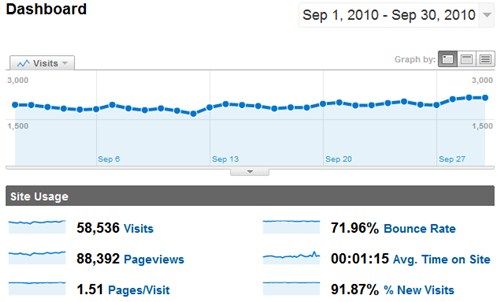
SheepTech Traffic for September 2010, by Google Analytcis

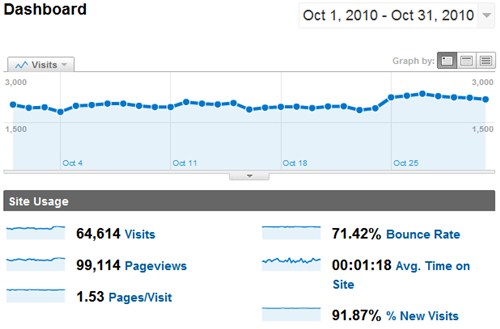
There is a slight growth of traffic, an increase of 1,488 uniques and 349 pageviews. Alexa ranking improved from 183,775 to 158,072.

Money Made

AdSense: $670.99 (+$145.62)
Infolinks: $61.38 (+$3.02)
BlogAds: $28.70 (-$23.10)
Contextweb (formerly ADSDAQ): $7.72 (+$4.23)
Private ads: $33.33 (+$0)

Total: $802.12 (+$129.77)

Uptime, RSS subscribers

99.98% uptime for the month of September thanks to HostGator’s outstanding performance. RSS subscriber’s count is at 545 at the time of writing.

This is a guest post by Maria Rainier.

Who says nothing in life is free? Not all of us have the money to blow on McAfee and Kasperskey for basic anti-virus software, ridiculous long-distance phone bills, and the like. Here are some basic freeware options to keep your money where it belongs—in your account.

Avast Free Anti-Virus

AvastThe multiple shields of Avast provide premium safety for your computer and web-browsing for free. The newest version, Avast Free 5 (previously the Home Edition), according to CNET, protects the computer with manifold defenses: antivirus, antispyware, behavioral shield, and adjustable mail and file system shields that join pre-existing behavior, network, instant messaging, peer-to-peer, and Web shields.

Its independent third-party testing has been able to compete with bigger (more expensive) names like Symantec and Microsoft.

Most noticeably, Avast Free 5 has had a makeover. It’s now got a smooth, more manageable UI as opposed to its previous skinnable (albeit confusing) look. Otherwise new to Avast is the capability to silence the vocal announcements upon startup that, despite daily repetition, used to scare the pants off of me. An “intelligent scanner” looks at changed files after establishing a standard.

Click to continue →

It can be a fun experience to buy a new computer, or to reformat your old PC so that it works like a new one, but having to reinstall all your favorite freewares is probably as meh as it sounds.

Introducing Ninite, a tool that helps you bulk install freewares of your choice without you downloading them one by one from their individual website, start the installer, clicking “Next”, read carefully to make sure you’re not trapped to install Ask Toolbar and to change your homepage and default search engine to Ask.com.

The list of freewares are very well covered (total of 78 apps), so chances of your favorite freeware not in the list is pretty slim. You can even suggest an app if you think it deserves to have a place in the list.

Pick software from Ninite

Once you are done selecting your freewares, download the installer, which upon launching, will download your freewares and install them on your behalf. The best part, in my opinion, is really the ability of Ninite to filter out all unwanted toolbars and other junks that normally comes with the installer of even the most famed freeware.

Just send a link to Ninite to your non-tech-savvy friend so that they wouldn’t get back to you asking you to get rid of that unwanted toolbar, or complaining Google is missing from his browser. Sweet isn’t it?

Ninite is also available for both Windows and Linux.

If you rather risk your real email address on suspicious websites than to take a few moment to generate a temporary email address, you are now covered.

Insert temporary email

With Less Spam, Please, a Firefox add-on, you can generate a temporary email address right within the browser itself. Simply right-click on an email field and click on “Insert a temporary mail address“, a random email address capable of receiving emails will be generated.

Right-click again and select “Open the temporary email mailbox for this site” and you can check your mail. The generated email address for any given website will always remain the same.

Enter mail prefix

After installing the add-on, you are required to first select a mail prefix before anything would work. On the same options panel, you can also select your preferred disposable email provider (YopMail, Humaility, Mailinator or trash-mail.com).

At the time of writing, this add-on is compatible with Firefox 3.6 – 4.0b6.

We all know how frustrating it is to work with forwarded emails, unprofessionally written articles, incompatible text document format and the likes. Such articles are a pain in the ass to clean, with weird symbols, random spaces, random uppercase lowercase etc throughout.

CleanHaven screenshot

If you can relate to such scenario, CleanHaven is your savior. It is an all-in-one text cleaning tool with abilities ranging from case formatting to removal of excess spacings—from replacing word “A” with word “B” to removing duplicates.

It’s not possible to list out everything it can do, so it’s best if you hop over to CleanHaven’s homepage and watch the screencasts (bottom of the page). I’ve embedded part 1 of the video below, there are 7 parts in total all demo-ing different features.

Works on Windows, Mac and Linux. Now it would be nice if there’s a web app version of this.

This. Cool face + Internet Explorer = win.

Problem?

Subscribe via EmailSend me updates to this email: